Avoid a restrictive Month filter cancelling the Date expansion produced by the box.
Container-only setup
When Year, Month and Date inputs are all inside The Filter Box, no extra period interaction setup is needed. Same-calendar owned selections are held as period inputs during the expanded range.
When using native Year/Month slicers
- Enable the native input slicer’s interaction with The Filter Box.
- Disable that native input’s interaction with destination measure visuals.
- Let The Filter Box filter those destination visuals.
- Disable the box’s interaction back to the native input slicers.
- Use one input control per field and verify MTD/QTD/YTD after changing the endpoint.
Understand the scope
This shares calculation context; it is not automatic two-way checked-item synchronization between arbitrary native slicers. External page/report filters are not cleared. A native September filter still active on the destination can intersect YTD back to September.
Use the simplest arrangement
For a compact, self-contained period workflow, bind Date plus its Year/Month/Fiscal attributes to the box and use its own inputs.
Route native slicers through the box
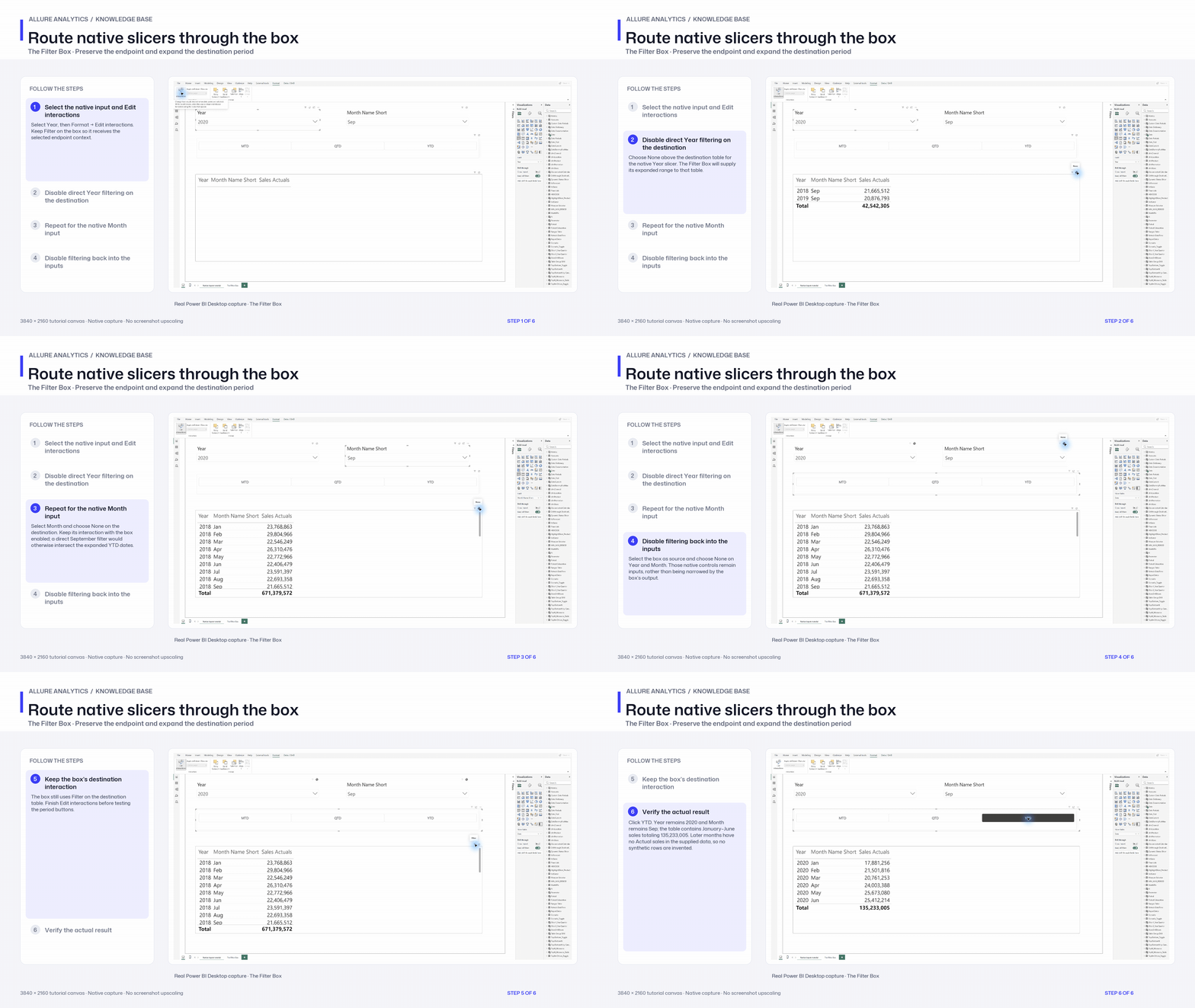
Native interaction-editing and YTD test on a dedicated report page using the supplied semantic model. Year/Month feed the connected Date field; the destination receives the box’s range.
3840 × 2160 tutorial canvas at 20 fps. Real 2560 × 1392 Power BI Desktop screenshots retain their native size; this is a paced step sequence.
- Select the native input and Edit interactions — Select Year, then Format → Edit interactions. Keep Filter on the box so it receives the selected endpoint context.
- Disable direct Year filtering on the destination — Choose None above the destination table for the native Year slicer. The Filter Box will supply its expanded range to that table.
- Repeat for the native Month input — Select Month and choose None on the destination. Keep its interaction with the box enabled; a direct September filter would otherwise intersect the expanded YTD dates.
- Disable filtering back into the inputs — Select the box as source and choose None on Year and Month. Those native controls remain inputs, rather than being narrowed by the box’s output.
- Keep the box’s destination interaction — The box still uses Filter on the destination table. Finish Edit interactions before testing the period buttons.
- Verify the actual result — Click YTD. Year remains 2020 and Month remains Sep; the table contains January–June sales totaling 135,233,005. Later months have no Actual sales in the supplied data, so no synthetic rows are invented.