Use a running contribution story or a reference-to-Actual bridge in the card’s trend area.
Pick the arithmetic first
| Mode | Fields | Meaning |
|---|---|---|
| Simple waterfall | Trend axis + Actual | Signed contributions accumulate; Result anchors the balance |
| Variance waterfall | Trend axis + Actual + reference | Period changes bridge reference total to Actual total |
Result and cost settings
Choose Waterfall IBCS, then the simple/running or variance mode. Assign Result or Cost change to the individual category where appropriate. These settings are saved independently per mode. A Result is an anchor, not an extra contribution. Already-negative expenses should not be inverted again.
A KPI Card with an IBCS waterfall, comparison rows and highlighted difference.
Click to enlarge.
When Actual stops before the plan
The variance waterfall’s default Treat missing side as zero keeps reference-only months as their own contributions. If July has Forecast 22.6M and blank Actual, the reference-to-Actual change is −22.6M. Source blanks remain identifiable; the card does not invent Actual.
Enable the Actual/Plan/Forecast separator to mark the first outlook period after the final observed Actual. Interior blanks do not create a transition. Keep gaps remains an available alternative. Genuine differences between model endpoints and displayed contributions can require a context adjustment.
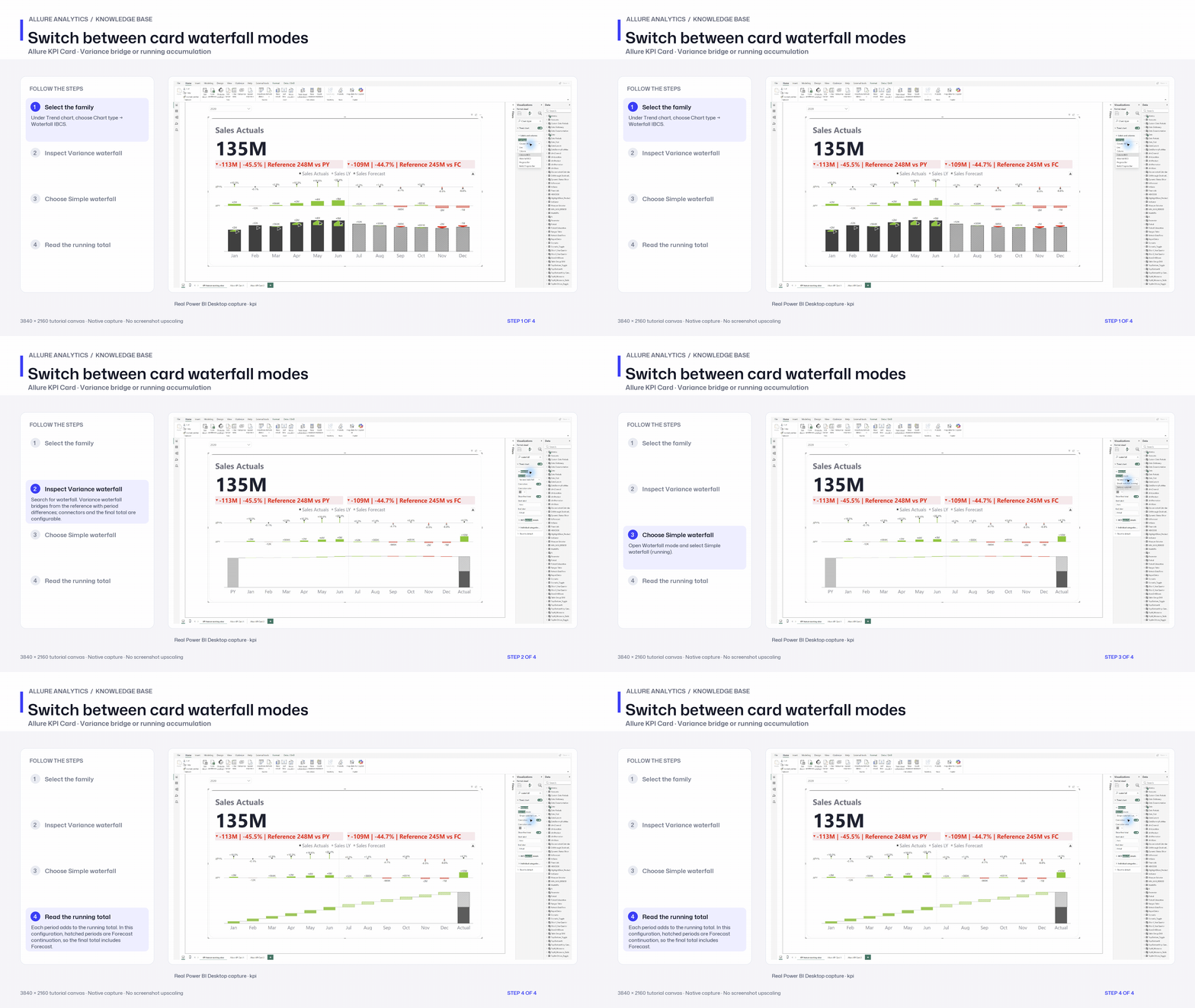
Switch between card waterfall modes
Waterfall IBCS family and Simple/Variance mode chapter. This captured configuration continues trailing Actual with Forecast; its combined total differs from the Actual headline.
3840 × 2160 tutorial canvas at 20 fps. Real 2560 × 1392 Power BI Desktop screenshots retain their native size; this is a paced step sequence.
- Select the family — Under Trend chart, choose Chart type → Waterfall IBCS.
- Inspect Variance waterfall — Search for waterfall. Variance waterfall bridges from the reference with period differences; connectors and the final total are configurable.
- Choose Simple waterfall — Open Waterfall mode and select Simple waterfall (running).
- Read the running total — Each period adds to the running total. In this configuration, hatched periods are Forecast continuation, so the final total includes Forecast.