Keep running contributions, scenario bridges and snapshot breakdowns distinct while using the shared field wells.
Pick the arithmetic first
Real renderers, explicit sample fields
These figures were captured from the unchanged current .pbiviz packages with documented sample data. They preserve the referenced chart families and variants. Your screenshots are included in Reference gallery. Full source data was not attached; example values are illustrative unless transcribed from a visible table. Field names and binding roles are explicit, and each example includes downloadable sample data.
A Simple waterfall uses signed contributions and Result balances. A Variance waterfall uses category differences to bridge reference and Actual totals. Breakdown uses the changes between category snapshots. Stacking adds components; hierarchy supports segmented or continuous running balances.
All twelve variants
| Variant | Fields used in the example | Picture |
|---|---|---|
| Simple waterfall | Category / Hierarchy: Account[Account line] Actual: [Sales Actuals] | |
| Variance waterfall | Category / Hierarchy: SalesChannel[ChannelName] Actual: [Sales Actuals] Previous year: [Sales LY] | |
| Combination waterfall | Category / Hierarchy: Date[Month Name Short] Actual: [Sales Actuals] Plan: [Sales Plan] Previous year: [Sales LY] Plan: [Sales Plan] | |
| Stacked waterfall | Category / Hierarchy: Date[Year] Actual: [Sales Actuals] Breakdown / Stacking / Series: SalesChannel[ChannelName] | |
| Stacked variance waterfall | Category / Hierarchy: Date[Month Name Short] Actual: [Sales Actuals] Plan: [Sales Plan] Breakdown / Stacking / Series: SalesChannel[ChannelName] | |
| Breakdown waterfall | Category / Hierarchy: Date[Year] Actual: [Sales Actuals] Breakdown / Stacking / Series: SalesChannel[ChannelName] | |
| Stacked breakdown waterfall | Category / Hierarchy: Date[Year] Actual: [Sales Actuals] Breakdown / Stacking / Series: Product[ProductCategoryName] → SalesChannel[ChannelName] | |
| Continuous waterfall | Category / Hierarchy: Date[Year] → Account[Account line] Actual: [Sales Actuals] | |
| Regular / segmented waterfall | Category / Hierarchy: Date[Year] → Account[Account line] Actual: [Sales Actuals] | |
| Measure waterfall | Category / Hierarchy: Optional Actual: [Sales Actuals] Actual: [Sales LY] Actual: [Sales Forecast] | |
| Side-by-side waterfall | Category / Hierarchy: Account[Account line] Actual: [Sales Actuals] Plan: [Sales Plan] | |
| Layered running waterfall | Category / Hierarchy: Date[Month Name Short] Actual: [Sales Actuals] Actual: [Sales LY] |
Configure Results for the selected variant
Select a category in the waterfall category options and mark it as Result. Result settings are scoped to the active variant, so a balance anchor in one waterfall does not silently change another variant. Choose Use bound value when your measure already provides that subtotal/balance. Cost inversion is for positive-stored contributions that need a negative direction.
The field recipe is not a license to add different units: a Measure waterfall with Sales Actuals, Sales LY and Sales Forecast is an illustrative sum of three money measures. Its resulting Total has meaning only if that is the intended comparison.
Business examples
Income statement and cash-flow Result waterfalls and Price–Volume–Mix: from Sales LY to Sales Actuals.
Match a waterfall to its data
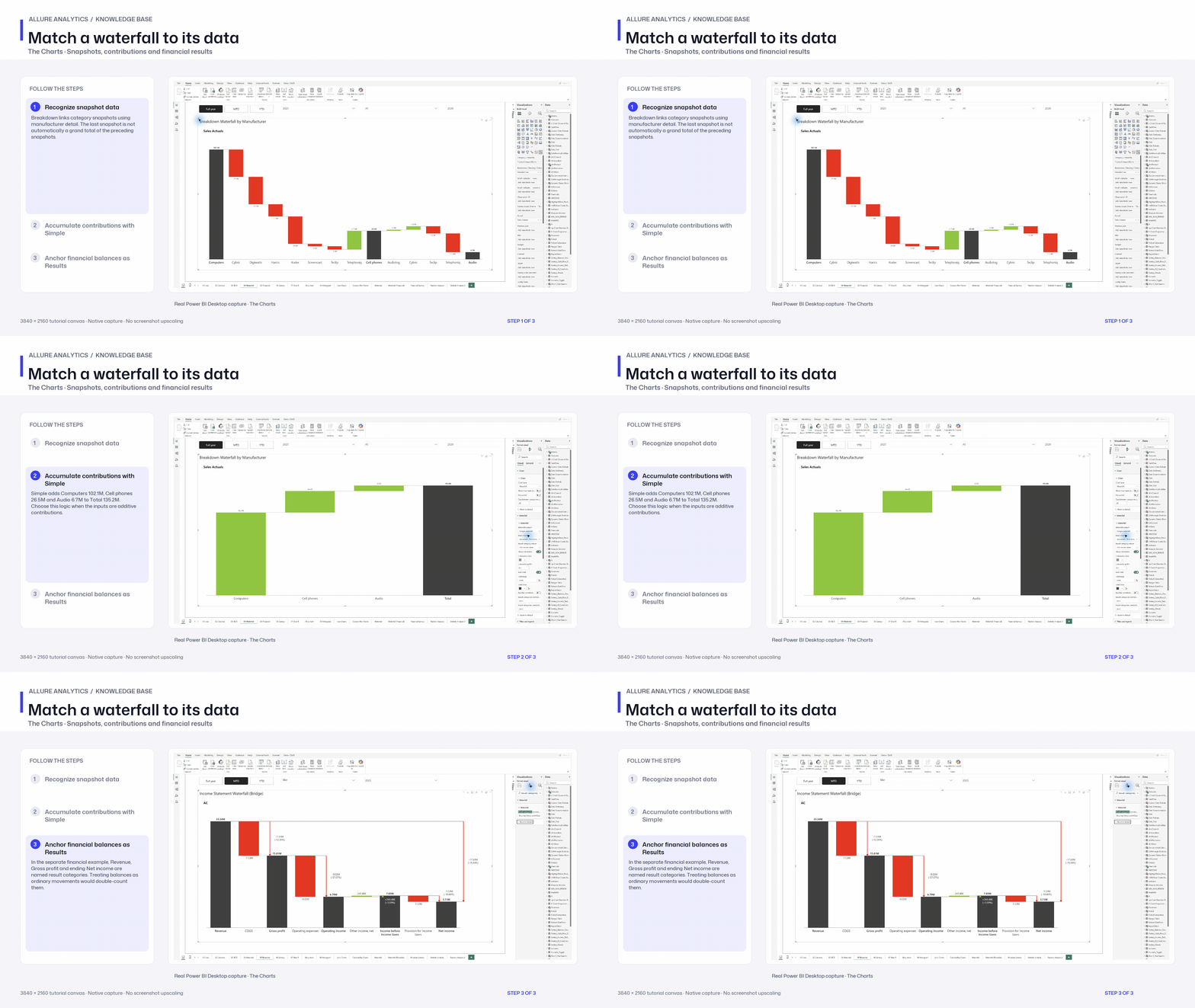
Native representative waterfall recipe tour. The supplied product snapshots and financial statement are separate datasets.
3840 × 2160 tutorial canvas at 20 fps. Real 2560 × 1392 Power BI Desktop screenshots retain their native size; this is a paced step sequence.
- Recognize snapshot data — Breakdown links category snapshots using manufacturer detail. The last snapshot is not automatically a grand total of the preceding snapshots.
- Accumulate contributions with Simple — Simple adds Computers 102.1M, Cell phones 26.5M and Audio 6.7M to Total 135.2M. Choose this logic when the inputs are additive contributions.
- Anchor financial balances as Results — In the separate financial example, Revenue, Gross profit and ending Net income are named result categories. Treating balances as ordinary movements would double-count them.